
You type a Snapchat username into a Story viewer.
Maybe you want to watch a creator’s latest update. Maybe you don’t use Snapchat and just want to see a Story someone mentioned, anonymously.
But the question is: what will actually appear? 🤔
Their public Stories?
Every video they have posted?
The Stories they share only with friends?
Or their private conversations?
This is where it gets confusing, so we have described everything a Snapchat Story viewer can show.
One thing to note clearly, in short:
A Snapchat Story viewer can show public content that is still available on the live Snapchat app. It cannot open someone’s private account.
Knowing the difference helps you understand the results—and why sometimes nothing appears.
A Public Profile Does Not Mean Everything Is Public
Imagine a creator named Alex.
He posts a cooking video for everyone, a birthday photo for his friends, and a personal update for a few selected people.
All three posts belong to Alex, but they have different audiences. A public Story viewer may show the cooking video.
But it does not give you access to the birthday photo or personal update.
Tip: Snapchat lets people choose who can see their Stories.
That choice still matters when you search their username on another website.
Source: values.snap.com
What Can You See Through a Snapchat Story Viewer?
Public Stories are the main thing to look for. These are photos or videos someone has chosen to share publicly, rather than only with friends.
Depending on the website, a result may also include a username, display name, or other public profile details. These help you check that you found the right person, especially when several accounts have similar names.
Some tools also support Spotlight videos or Stories a creator has saved to their public profile. However, each tool has its own features.
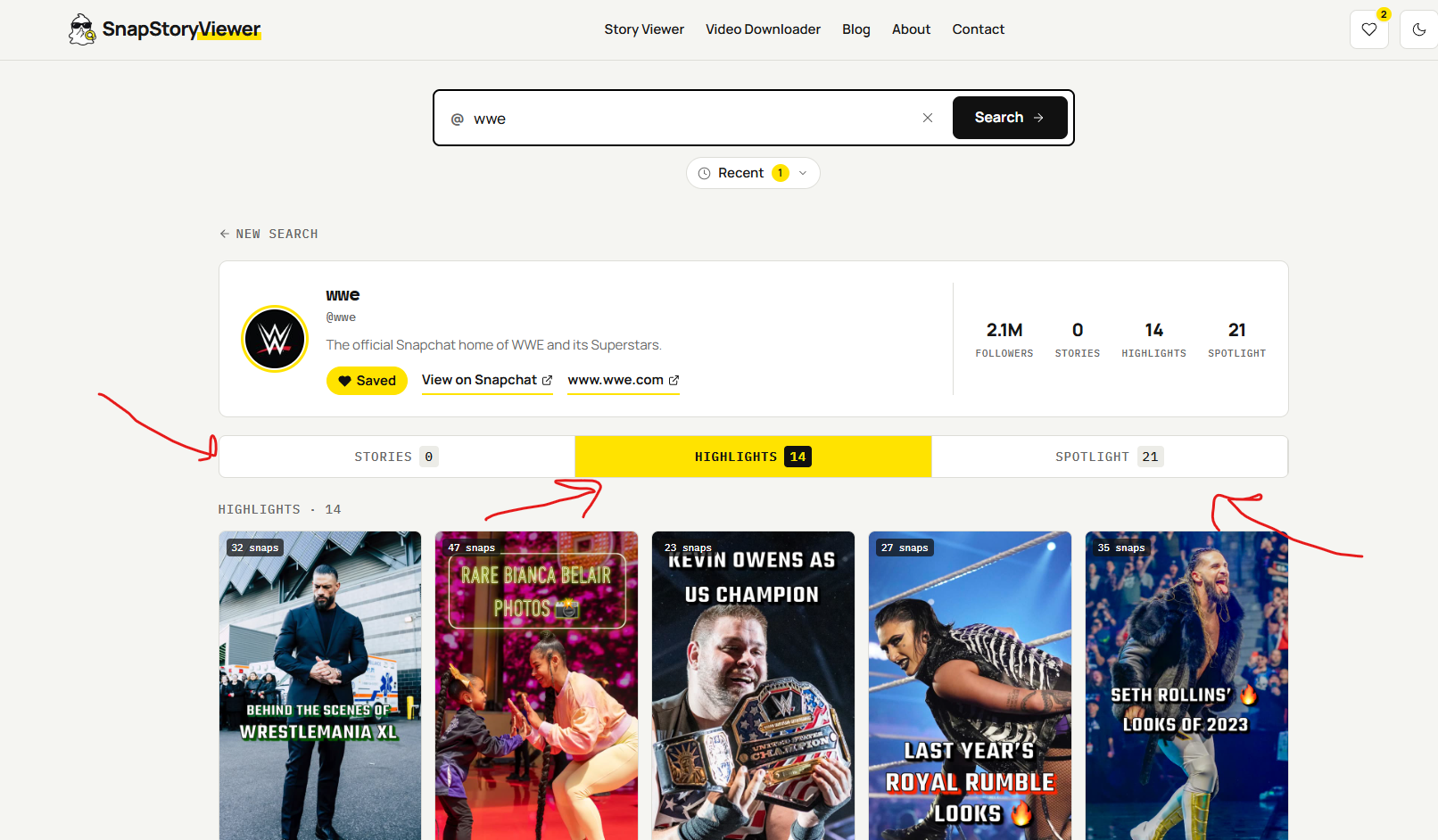
Our tool, SnapStoryViewer.net, lets you view Stories, Highlights, and Spotlight, plus other public details like followers, following, and username.
Here is the useful question to ask before searching:
“Has this person shared the content publicly, and does this tool support it?”
What Can’t a Story Viewer Show?
Knowing someone’s username does not open their private Stories, messages, or saved photos.
| What you want to see | Can a public Story viewer show it? |
|---|---|
| An available public Story | Yes, if the tool supports it. The good news is that our tool supports it. |
| A Story shared only with friends | No |
| A Private Story for selected people | No |
| Private chats and Snaps | No |
| Photos kept privately in Memories | No |
| My Eyes Only photos | No |
| Snapchat Planets or Best Friends rankings | No |
Snapchat separates public sharing from private Stories and saved Memories. Planets is a Snapchat+ friendship feature inside the app, rather than something a public Story viewer can reveal.
Source: values.snap.com
For example, if someone includes you in a Private Story, you can view it through your Snapchat account. Searching their username on a public viewer does not carry that access over.
Why Does a Search Sometimes Show Nothing?
You know the account exists. You checked the spelling. Still, no Stories appear.
That can be confusing, but an empty result does not tell you exactly what happened.
Start with these simple checks.
Are You Using the Right Username?
The name someone displays on Snapchat may be different from their username. If the viewer asks for a username, enter that—not just the name you remember.
Copy it from a profile link the person has shared when possible. A small spelling mistake can lead to the wrong account or no result.
Have They Posted a Public Story?
Someone can use Snapchat every day without sharing Stories publicly. They might send Snaps to friends or post Stories for a smaller audience.
So, “They are active on Snapchat” does not always mean “There is something a public viewer can show.”
Is the Story Still Available?
Perhaps you saw a link yesterday and tried opening it today. The Story may have expired, or the creator may have deleted it.
A Snapchat Story viewer is not a complete history of someone’s account. It should not be treated as a way to bring back every old post.
Is There a Loading Problem?
Sometimes the problem is technical. Try refreshing the page once, checking the username, and returning later.
If the result stays empty, avoid jumping to conclusions. A missing Story alone does not prove that someone blocked you.
How Can SnapStoryViewer.net Help?
If you want to check available public Stories, you can try SnapStoryViewer.net using the person’s Snapchat username.
Before searching, decide what you want to find. A creator’s public update is a suitable reason to try a public Story viewer. A friends-only post needs the right access inside Snapchat.
The process is simple:
- Find the person’s correct Snapchat username.
- Open SnapStoryViewer.net and follow the search instructions.
- Check that any account details shown match the person you meant.
- Browse the public Stories returned by the tool.
If nothing appears, go through the checks above. Searching again cannot turn a private Story into a public one.
What About Older Stories and Saved Videos?
There is a difference between a Story that has disappeared and one the creator has saved publicly.
Snapchat allows creators to keep selected Stories on their public profiles. Whether you can see those through a viewer depends on the tool’s features.
Source: values.snap.com
That is why a promise such as “see every Story ever posted” deserves a closer look.
A current public Story, a saved public Story, and a deleted Story are three different things.
If a tool offers downloads, remember that saving a video does not give you permission to repost it. Ask the creator before using their work on your own page.
Does a Viewer Need Your Snapchat Password?
Be careful if a site asks for your Snapchat password to show public Stories. Do not hand over your account details just because a page promises more results.
Also, read privacy claims carefully. “No Snapchat login” does not automatically mean a website collects no information. Check its privacy policy before assuming what it records.
Before You Try Your Next Search
Ask yourself one question: “Am I looking for something this person shared publicly?”
If the answer is yes, SnapStoryViewer.net is a place to check for available public Stories. If the content was shared only with friends or selected people, you need the right access through Snapchat.
That small distinction can save you a lot of guessing when a search comes back empty.