
Updated 14 October 2026
Your friend has a different Snapchat icon, a star beside their name, and a planet on a Friendship Profile. You still send Snaps, chat, and watch Stories for free. So what are they paying for?
Snapchat+ adds optional features to the same app. Standard Snapchat still provides the core experience. The paid upgrade mainly adds personalization, friendship and Story tools, extra controls, and Memories storage.
The plan matters. Base Snapchat+, Lens+, and Platinum do not include exactly the same benefits. Check the offer shown on your account before subscribing.
The main differences at a glance
Feature | Standard Snapchat | Base Snapchat+ |
|---|---|---|
Snaps Chat Stories Spotlight | Core features available | Same core features |
Premium personalization | Standard options | Extra icons themes sounds and backgrounds |
Story rewatch count | No subscriber rewatch indicator | Counts friends who rewatched |
Story expiry | Normally 24 hours | Choose from 1 hour to 1 week |
Friendship extras | Normal friend features | Pin BFF Solar System extended list |
Chat activity extras | Normal Chat experience | Peek a Peek and Friends in Chat |
Memories cloud storage | Up to 5GB complimentary | Typically 250GB |
Ad removal | Ads can appear | Base plan does not include Platinum ad removal |
Subscription price | No Snapchat+ subscription | Local price shown at checkout |
Feature availability can vary by region, account, app version, and rollout. The sections below explain the important limits.
Story features explained
Story views and the Rewatch Indicator
You do not need Snapchat+ just to see who viewed My Story. Standard Snapchat lets you swipe up to check views and screenshot information; its help page says viewer names are shown for up to 200 Snapchatters.
Snapchat+ adds the Rewatch Indicator. It counts friends who watched again, rather than every extra play. It does not reveal which specific friends rewatched.
Example: if three friends each watch your Story twice, the indicator can show three friends. It is not a list of three named rewatchers. A friend watching repeatedly does not turn the count into their total number of replays.
Custom Story Expiration
The My Story Timer offers 1 hour, 6 hours, 12 hours, 24 hours, 2 days, 3 days, or 1 week. Standard My Story Snaps normally expire after 24 hours. Choose the duration when sending the Snap to My Story.
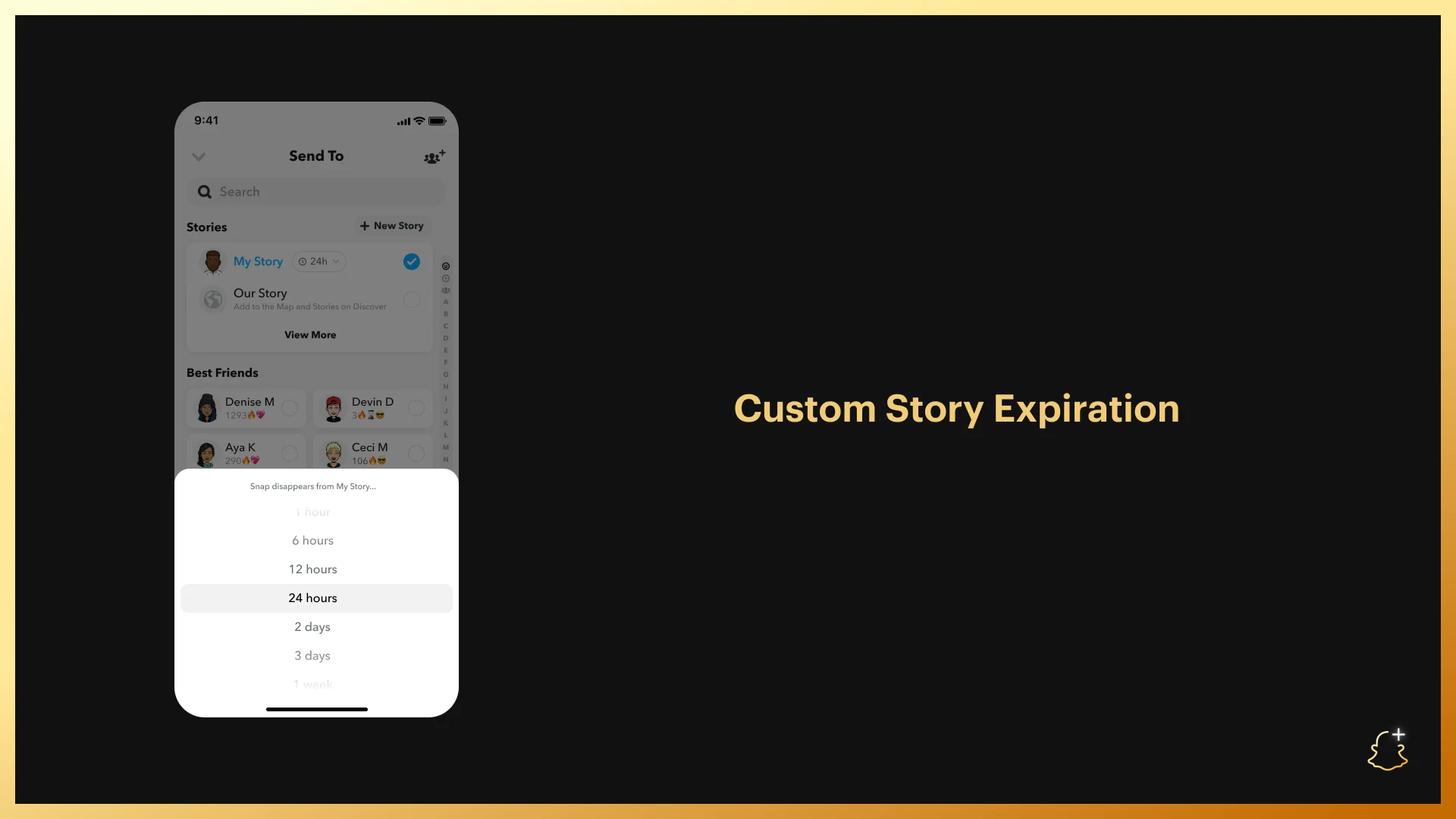
Official October 2022 interface example. Current timer options are confirmed in Snapchat Support.
Image credit: Snap Inc. / Snapchat official source
Timestamps and notifications
Story Timestamps show viewing times beneath friends’ names in your Story viewer list. Story View Notifications alert you the first time a selected friend views your Story. These are separate controls, not a record of everything someone does in the app.
Story Boost
One included boost each week runs for 24 hours. Snapchat describes it for Friend or Private Stories and says it is not for commercial or advertiser use. An unused weekly boost expires. It is not a promise of viral public reach.
Friendship and Chat features explained
Pin your number one Best Friend
You can privately choose one #1 BFF. Only you see who you pinned. If two Snapchat+ members pin each other, both see a special Best Friend Emoji. This is a chosen pin, not proof that your interaction ranking is mutual.
Friend Solar Systems
On an eligible Friendship Profile, tapping the gold-ring Best Friends badge shows your planet in that person’s Solar System. The planets represent positions in their Best Friends list. The feature is off by default for first-time subscribers.
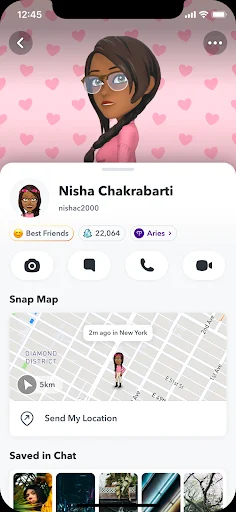
An actual Friendship Profile example supplied by Snapchat Support. The Best Friends badge is the entry point to Solar System. Interface appearance can vary.
Image credit: Snap Inc. / Snapchat official source
Mercury represents the first position, followed by Venus, Earth, Mars, Jupiter, Saturn, Uranus, and Neptune. The display describes app interactions; it is not a measure of affection or a complete view of someone’s friendships.
Extended Best Friends List
This shows your current eight Best Friends, your next eight upcoming Best Friends, and movement since your last check. It extends your own list rather than opening everybody else’s full list.
Peek a Peek and Friends in Chat
Peek a Peek shows when a friend is peeking into your shared conversation. You must be looking at your Chat feed or in that Chat at the same time. It is not a later notification log of every half-swipe.
Friends in Chat shows a friend’s Bitmoji holding a phone when they are present in your Chat but not typing. It is a presence cue for that conversation.
Personalization and subscriber identity
If you enjoy making Snapchat look and sound different, personalization is one of the clearest reasons to consider the upgrade. These features change the experience you use every day; they do not unlock private content.
Area | What Snapchat+ adds | What that means |
|---|---|---|
App icon | A choice of subscriber icons | Change the home-screen icon |
App theme | Capture button and other appearance controls | Theme availability is still rolling out |
Chat wallpaper | Preset or camera-roll backgrounds | Personalize the backdrop of a conversation |
Notification sounds | Different friend notification tones | Recognize a friend by the alert sound |
Bitmoji backgrounds | Extra profile-background choices | Give your profile a different look |
Other customization | Chat colors ringtone options pets and cars | Check the subscriber controls in your account |
Snapchat’s product pages list these subscriber options. Its theme guide explains that Custom App Themes may not yet be available to every subscriber. Chat wallpaper examples are described in Snap’s official product announcement.
How the Snapchat+ badge works
The black star subscriber badge is optional and off by default. You can enable it on your Snapchat+ membership card. Having no visible badge does not prove that someone uses the free version.
A Snapchat+ badge is not a Snap Star verification label. It indicates a paid subscription, not confirmed identity, authenticity, or endorsement by Snap.
Early access does not mean a fixed lifetime bundle
Snapchat describes the subscription as including exclusive, experimental, and pre-release features. Experiments can change and rollouts can differ. Check the specific feature you want on your account instead of buying only because an old article lists it.
What stays available on standard Snapchat
The free app still lets you Snap and Chat with friends, use its standard creative tools and Lenses, watch Stories and Spotlight, and explore Snap Map. Snapchat+ complements these activities rather than being required for basic communication.
Snaps Streaks and creator replies
Replay Again
Subscribers can replay a Snap twice immediately after viewing it. You must stay on the Chat screen; leaving before replaying removes that opportunity. This is an extra immediate replay, not unlimited access to old or deleted Snaps.
Lightning Snaps
These add photo-Snap timer choices shorter than one second. They make a Snap more fleeting, but do not make a privacy promise about capture or saving.
Monthly Streak Restore
Snapchat+ includes one free in-app Streak Restore each subscription month for an eligible recently expired Streak. Additional restores require an in-app purchase. Unused restores do not roll over.
Example: if your subscription begins on the 14th, the included restore resets on the 14th of the next month. Check eligibility in the app rather than assuming a very old Streak can be recovered.
Instant Streaks
A one-day Streak can appear in some one-to-one or Group Chats after exchanging Snaps. Snapchat says it may appear when you or a friend enables the subscriber setting, and for some special occasions. Availability varies by location.
Snapscore Multiplier
With the setting enabled, your score grows twice as fast when you send Snaps to or receive them from other Snapchat+ subscribers. It is off by default. It is not a blanket doubling of every interaction with every account.
Priority Story Replies
On eligible Public Stories where a creator can respond, subscriber replies receive higher placement in the creator’s reply list. That improves placement; it does not require the creator to read or answer you.
Other creative extras to look for
The official catalogue also lists Post View Emoji, Replay Your Own Snaps, Home Tab, AI Captions, AI Creative Tools, and generative chat and profile backgrounds. Check their controls and availability inside your subscription. These are additions to the app, not automatic access to every Lens+ feature.
Memories storage and the different plans
Storage is now a practical part of the comparison. Snapchat Support lists up to 5GB of complimentary Memories storage, typically 250GB with Snapchat+, the same allowance with Lens+, and 5TB with Platinum. Check the allowance shown in your plan.
Option | Main benefits | Memories storage |
|---|---|---|
Standard Snapchat | Core Snapchat experience | Up to 5GB complimentary |
Memories-only plan | Paid storage without the Snapchat+ feature bundle | 100GB |
Base Snapchat+ | Subscriber customization and interaction features | Typically 250GB |
Snapchat+ Family | Subscriber plus two additional people | 250GB per member |
Lens+ | Snapchat+ plus exclusive Lenses and AI tools | Same as Snapchat+ |
Platinum | Snapchat+ Lens+ higher AI allowance and specified ad removal | 5TB |
The Family plan covers three people in total, not an unlimited household. Moving its subscriber to another plan removes the other members’ subscription access. Some plans are unavailable in some regions.
The storage change is not immediate deletion
As of this article’s update, Snapchat says Memories will not be automatically deleted simply because you do not upgrade. Its announced archive changes begin no earlier than January 2027, with advance in-app notice. Check the current storage notice on your account for how the rollout applies to you.
Base Snapchat+ is not the ad removal plan
Platinum is the tier described as removing Sponsored Snaps and Story and Lens ads. Its help page notes that sponsored places and My AI responses can still appear. Do not treat base Snapchat+ as an all-ads-removed purchase.
Pick storage separately if that is all you need
A 100GB Memories-only plan is an option if your main problem is storage. Compare it with the local Snapchat+ offer before paying for features you do not intend to use.
Lens+ and AI features are a separate decision
My AI is available to Snapchatters and is not, by itself, a reason to assume you need Snapchat+. Subscriber creative tools and the premium Lens+ catalogue are different benefits.
Lens+ includes Snapchat+ features plus exclusive Lenses and AI experiences. Generative Lens use has a monthly allowance that resets on your billing date. Platinum includes a higher allowance; neither should be described as unlimited AI generation.
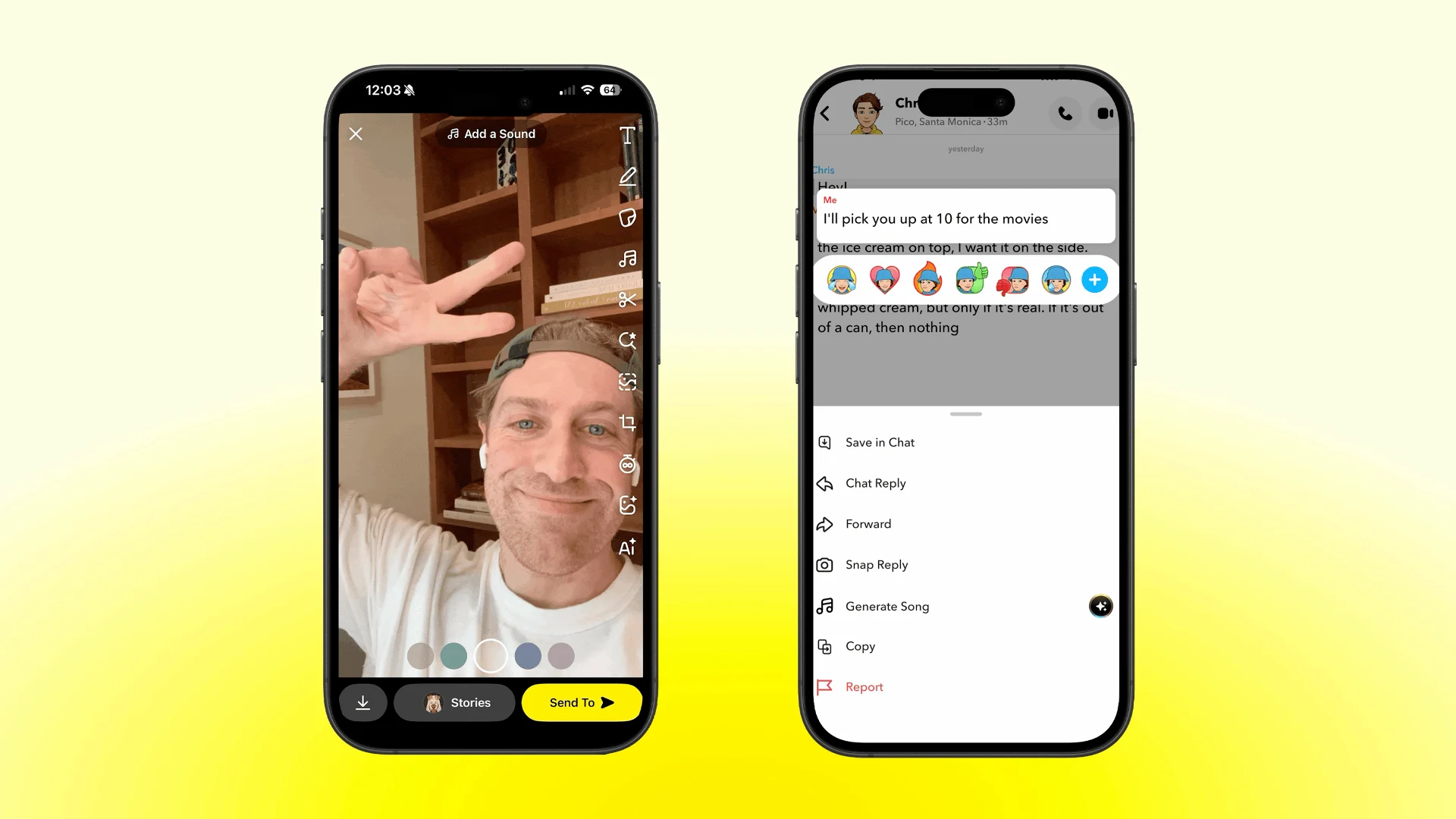
Official Lens+ product demonstration announced on 21 September 2026. This still is taken from Snap’s animation showing a Chat-to-song experience.
Image credit: Snap Inc. / Snapchat official source
The September 2026 Lens+ update
Tool | What it does |
|---|---|
Create Song | Turns a Chat message into a short original song |
AI Photoshoot | Helps improve an almost-good photo |
AI Remix | Creates a new stylistic response to a friend’s Snap |
Sticker remix | Reworks a sticker in different styles |
AI-enhanced fonts | Changes the visual style of caption text |
These are Lens+ experiences announced by Snap, not a list of base Snapchat+ entitlements. The rollout can vary by region. Use the plan comparison in the app to confirm access before purchasing.
Price value and the questions to ask before paying
How much does Snapchat+ cost?
There is no single reliable price for every reader. Snapchat says prices vary by country and device, and the price displayed on your device is what you will be charged. Open Profile or Settings → Snapchat+ and check your local offer.
Compare the full renewal amount, billing period, currency, trial conditions, and included tier. Do not assume a launch-era US price is today’s price in Pakistan or another market.
Which version makes sense for you?
Your main use | Start with |
|---|---|
Messaging friends and watching public content | Standard Snapchat |
Customizing the app and using friendship or Story extras | Base Snapchat+ |
Keeping a larger Memories collection | Compare Memories-only with Snapchat+ |
Trying exclusive AR and AI creative tools | Lens+ if available |
Specified ad removal plus Lens+ and much more storage | Platinum if available |
An upgrade is most useful when you can name the features you will actually use. If you only want to send Snaps and watch Stories, start with the free experience.
How to subscribe or manage the subscription
Open your Profile, tap the Snapchat+ banner, and choose a plan. Read the purchase and renewal terms before confirming. Web subscriptions are also available, but Snapchat says Lens+ and Platinum are not offered through Snapchat+ web subscriptions.
Manage Apple or Google purchases through the corresponding store subscription settings. Web purchases have a Subscription Management page. Cancellation rules can differ by purchase route and region.
Frequently asked questions
Can Snapchat+ tell me exactly who rewatched? No. Its Rewatch Indicator counts friends who rewatched but does not identify them.
Does Snapchat+ make my account verified? No. A subscriber badge and a Snap Star verification label mean different things.
Will a paid plan unlock someone’s Private Story? Subscription extras are not a grant of permission to restricted posts. Access still depends on the audience the creator chose.